
Buying guide
Automatic Cat Feeder Blinking Red Light Meanings
The cause of a blinking red light changes by model. This table lists each color and blink from the manuals and help pages opened on Nov 10, 2026.
Editorial buying guide · Updated · ByPet Product Compass Editorial ·Editorial policy ·Methodology

The blinking red light asks for a check the model has to name
A blinking red light on an automatic cat feeder means the feeder wants attention, and the reason depends on the model in front of you. On the files opened for this page, red can mean an empty tank, a chute error, a jam, a low battery, or a connection problem. Fresh Element Solo (P570), YumShare Solo with Camera (P571), and YumShare Dual-hopper 2 (P592) describe white, green, or an unnamed Wi-Fi light. A red fault light is absent from those three indication sections.
The opened pages also use yellow, blue, green, white, and purple for other states. None of them prints the word orange. Match the nameplate to a row before you refill, unplug, or take the hopper apart.
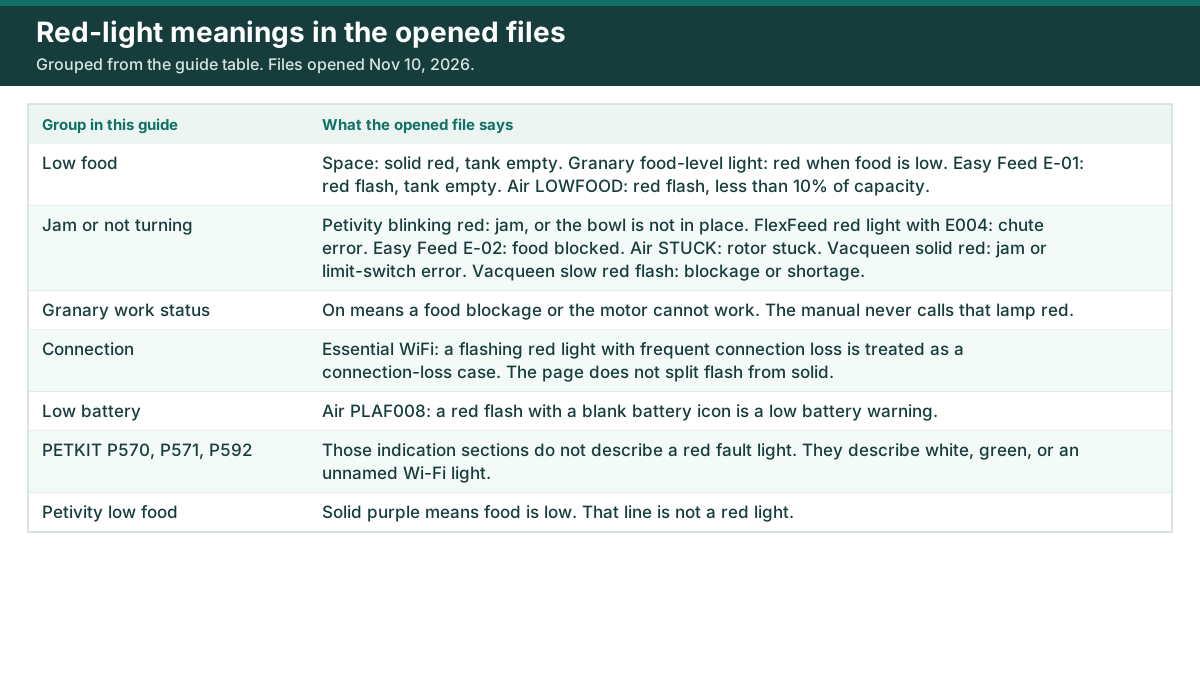
Automatic cat feeder blinking red light meanings in the opened files
Every row is the wording in the file linked on that row. All of those files were opened on Nov 10, 2026. Where the file does not name a color, or does not print a separate first action, the cell says so. Any timed flash or voltage in the table sits in the same row as its source.
| Model | Light | Pattern | Meaning in the file | Official first step | Source |
|---|---|---|---|---|---|
| PETLIBRO Granary, PLAF103 | Food level | Lights red | Food level is low. Off when the tank has enough food. | The indicator page does not state a separate first step. | Granary manual PDF |
| PETLIBRO Granary, PLAF103 | Lock | On, or off. Color not named. | On means the panel is locked. Off means the lock is off. The panel locks after 30 seconds of standby. | Hold the lock button for 5 seconds until the feeder sounds Di, DiDi. | Granary manual PDF |
| PETLIBRO Granary, PLAF103 | Wi-Fi | Flashes every 1 second, stays solid, or off. Color not named. | A flash each second means Bluetooth or AP mode, ready for the app. Solid means connected to Wi-Fi. Off means not connected. | If it is not flashing while you connect the app, hold reset until the Wi-Fi indicator keeps flashing. | Granary manual PDF |
| PETLIBRO Granary, PLAF103 | Work status | On, or off. Color not named. | On means a food blockage or the motor cannot work. Off means everything is working. | The indicator page does not state a separate first step. | Granary manual PDF |
| PETLIBRO Essential WiFi, AF101 / AF102 / PLAF101 / PLAF102 | Red | Flashing, with frequent connection loss | The help page treats this pair as a connection-loss case. It does not give flash and solid separate dictionary lines. | Unplug all power sources from the feeder. | Essential red-light help |
| PETLIBRO Essential WiFi, AF101 / AF102 / PLAF101 / PLAF102 | Red | Flashes or stays solid, or the app shows Unit Exception | The same page groups these together and does not split the meanings. | Disconnect all power sources from the feeder. | Essential red-light help |
| PETLIBRO Space, AF107 / PLAF107 | Indicator | Solid red | The food tank is empty. | Confirm the light is solid red. The next line on that page is to clean the low-food detection light. | Space low-food help |
| PETLIBRO Space, AF107 / PLAF107 | Abnormal indicator | Color not named | The page does not say what color an abnormal indicator is. | Power the feeder with the cord and adapter. The page says you may try another 5V 2A adapter and cord. | Space abnormal-indicator help |
| PETLIBRO Air, PLAF008 | Indicator | White, on | Normal. | The legend does not state a separate first step. | PLAF008 manual copy |
| PETLIBRO Air, PLAF008 | Red, with a blank battery icon | Flashes once every 1 second | Low battery warning. | Replace the batteries. | PLAF008 manual copy |
| PETLIBRO Air, PLAF008 | Red, with LOWFOOD on the screen | Flashes once every 1 second | Low food, less than 10% of total capacity. | Refill the food tank. | PLAF008 manual copy |
| PETLIBRO Air, PLAF008 | Red, with STUCK on the screen | Flashes once every 1 second | The rotor is stuck. | Remove food stuck in the rotor. | PLAF008 manual copy |
| PETLIBRO Air, PLAF008 | Light after a detector wipe | Flashes red, with LOWFOOD on the screen | PETLIBRO’s own low-food page uses this as the check after you power the feeder with the adapter and add no food. It is a detector test, and it does not describe a white-then-red startup. | Disassemble the food tank and its base. | Air LOWFOOD help |
| PETLIBRO Easy Feed, AF003 / AF004 / PLAF003 / PLAF004 | Red, with E-01 | Flashing | The food tank is empty. | Refill the food. The page says the flashing red light disappears within 60 seconds. | Easy Feed E-01 / E-02 help |
| PETLIBRO Easy Feed, AF003 / AF004 / PLAF003 / PLAF004 | Red, with E-02 | Flashing | Food is blocked in the dispensing system. | Clean the food bowl until no food is piled in it. | Easy Feed E-01 / E-02 help |
| PetSafe FlexFeed | Red light above the LCD, with E004 | The article says a red light. It does not say flash or solid. | An error in the chute, usually extra food backed up or an object stuck in the chute. | Unplug the feeder from the wall outlet. | FlexFeed red light / E004 |
| PETKIT Fresh Element Solo, P570 | Wi-Fi indication light | Slow blink, fast blink, steady, or off. Color not named. | Slow means offline, with no internet connection. Fast means connecting to Wi-Fi. Steady means connected to the internet. Off means the Wi-Fi indication light has been turned off. | The indication section does not state a separate first step. | P570 manual |
| PETKIT YumShare Solo with Camera, P571 | Status light | Slow white flash, fast white flash, steady white, or steady green | Slow white: not connected to Wi-Fi. Fast white: connecting. Steady white: connected, and the camera is not working. Steady green: connected, and the camera is working. On battery power this light stays dark, and the app can switch it off. | The indication section does not state a separate first step for these patterns. | P571 manual |
| PETKIT YumShare Dual-hopper 2, P592 | Wi-Fi light | Slow flashing white, fast flashing white, or solid white | Slow white: not connected to Wi-Fi. Fast white: connecting. Solid white: connected. | The indication section does not state a separate first step for these Wi-Fi patterns. | P592 manual |
| PETKIT YumShare Dual-hopper 2, P592 | Camera light | Solid green, or off | Solid green means the camera is on. Off means the camera is off. On battery power the camera light stays dark. | The app can turn the camera light on or off. | P592 manual |
| Petivity smart feeder | Status light | Solid white | Online and working. | The status list does not add a separate first step for solid white. | Petivity status lights |
| Petivity smart feeder | Status light | Blinking blue | Ready to connect to Bluetooth. | Keep the phone near the feeder. To try again, hold the status button on the back until the light turns blue, then release. | Petivity status lights |
| Petivity smart feeder | Status light | Blinking yellow | Offline. Check the Wi-Fi connection. | Check the Wi-Fi connection. | Petivity status lights |
| Petivity smart feeder | Status light | Solid purple | Food is low. | Refill soon. | Petivity status lights |
| Petivity smart feeder | Status light | Solid green | Action completed. | The status list does not add a separate first step. | Petivity status lights |
| Petivity smart feeder | Status light | Blinking red | Check for a device jam, or make sure the bowl is in place. | Do that jam and bowl check. The page says to contact Consumer Support if it continues. | Petivity status lights |
| Vacqueen Wi-Fi feeder | Startup | Blue on 2 seconds, red on 1 second, green on 1 second | Power-on sequence, then the feeder enters normal status. The blue light also stays on for 2 seconds during that self-check. | No repair step. This red flash is the startup sequence. | Vacqueen feeder page |
| Vacqueen Wi-Fi feeder | Left blue | Slow flash, fast flash, or solid | Slow: Bluetooth waiting, or the device waiting to pair. Fast: pairing or connecting. Solid: connected. | The page states the pattern and does not add a separate first step. | Vacqueen feeder page |
| Vacqueen Wi-Fi feeder | Right green, child lock | Solid, fast flash, or off | Solid: child lock on. Fast flash of 3 times: the panel has been locked. Off: the lock is off. | Hold the child-lock button for 3 seconds to change the lock. The page says the panel locks itself after 1 minute with no operation. | Vacqueen feeder page |
| Vacqueen Wi-Fi feeder | Right red | Solid, or slow flash | Solid: food jam or a limit-switch error, and the motor is not rotating. Slow flash: food blockage or food shortage. | The page states the meaning and does not print a separate first step. Red outranks yellow and green if more than one status is true. | Vacqueen feeder page |
| Vacqueen Wi-Fi feeder | Right yellow | Flashes once every 3 seconds, or the feeder shuts down | At 3.8V or below, the light flashes once every 3 seconds. Around 3.4V, the feeder shuts down for protection. The yellow reminder can still show on external power if low batteries are installed. | The page states those voltage lines and does not print a separate first step. | Vacqueen feeder page |
Granary prints food level, lock, Wi-Fi, and work status as separate indicators. A red food-level light on that model is the low-food lamp. It is not the Wi-Fi lamp, and the manual never calls the work-status lamp red.
The PLAF008 color rows come from a manualspro.net HTML copy of that user manual. PETLIBRO’s own Air page opened here is the LOWFOOD detector check, not that full legend. The FlexFeed quick-start PDF was opened the same day and has no color table, so the FlexFeed row uses the PetSafe support article only.
White, then a flashing red light on plug-in
On a PETLIBRO Air, one owner described plug-in this way: “When I plug it in a white indicator light comes on for about a second, then switches to a flashing red light.” The r/Petlibro thread says the display never lit either. A later reply in that thread says: “There’s a solid plastic cover over the display that needs to be opened before the display is visible.” (reply)
PETLIBRO’s Air low-food page does not describe that white-then-red plug-in. After a detector wipe, it says to power the feeder with the adapter and no food in the tank, then look for a red flash plus LOWFOOD on the screen. The manualspro PLAF008 copy calls a steady white light normal, and it ties a red flash once every 1 second to the battery icon, the LOWFOOD line, or the STUCK line. It does not describe that plug-in sequence.
Essential WiFi is a different case. Its flashing-red track, the one paired with frequent connection loss, starts by unplugging every power source. Petivity says the first plug-in, or a reset, may show several lights while the feeder boots. That boot line is not a white-then-red fault code.
Red when the feeder should already be online
A connected PETKIT feeder is not using red for that state. On P570 a steady Wi-Fi light means connected to the internet, and the manual does not name the color. On P571, steady white means connected with the camera not working, and steady green means connected with the camera working. On P592, solid white means the Wi-Fi link is up.
Petivity uses solid white for online and working, and blinking yellow for offline. Essential’s help page puts a flashing red light in the same heading as frequent connection loss. That page does not say whether the app still lists the feeder during the flash. Granary can show a red food-level light while its separate Wi-Fi indicator is solid. Those are two lamps.
A jam light goes to the food-outage guide
These rows point at food that is stuck or a motor that is not turning: Petivity’s blinking red light, which is also the check that the bowl is seated; FlexFeed’s red light with E004; Granary’s work-status light when it is on; Easy Feed’s red flash with E-02; Vacqueen’s solid red light; Vacqueen’s slow red flash, which also covers a shortage; and Air’s red flash when the screen says STUCK.
Space’s solid red light, Granary’s red food-level light, Easy Feed’s E-01 flash, Air’s LOWFOOD flash, and Petivity’s solid purple light are low-food lines. They are empty-tank or low-food signals on those pages.
If meals are not coming out, continue with automatic cat feeder not dispensing food. That guide follows PETKIT’s order, from the manual-feed test through a chute blockage. Use the single first step in the table for your model, then that guide. A dark lamp, with no red at all, is the power and app-indicator check already written there.
PETKIT models named in the light table
The three PETKIT indication sections are in the table above. The reviews below are the model pages on this site. They do not repeat the light legend.
Fresh Element Solo is the single-hopper feeder, product code P570. YumShare Solo with Camera is product code P571. YumShare Dual-hopper 2 is model P592. Other brands in the table stay as the help page or manual linked on their row.
Files opened for this light table
Opened on Nov 10, 2026: the Chewy-hosted Granary PLAF103_V1.0 manual; PETLIBRO help pages for the Essential WiFi red light, the Space low-food light, the Space abnormal indicator, the Air LOWFOOD detector, and Easy Feed E-01 and E-02; a manualspro.net HTML copy of the PLAF008 manual, used because the maker PDF hosts did not return that file; the PetSafe FlexFeed red-light article; the FlexFeed quick-start PDF, which has no indicator-color table; the PETKIT manuals for P570, P571, and P592; the Petivity smart-feeder help page; the Vacqueen feeder page; and the r/Petlibro Air thread through its Atom feed.
Product-selection path
Products referenced in this guide
A one-pet dry-food routine that does not require video monitoring
- Best for
- A one-pet dry-food routine that does not require video monitoring
- Before buying
- Confirm the current listing details.
Skip if: You serve wet food, need 5 GHz connectivity, want camera confirmation, or need a larger two-hopper format.
What to verify before buying
Product listings can change. Check the exact variant, size, ingredient or material information, directions, warnings, seller, return terms and current availability before buying.
Last checked: 2026-07-17. This page does not present hands-on product testing.

A one-pet routine where visual meal checks are worth the extra setup and privacy decisions
- Best for
- A one-pet routine where visual meal checks are worth the extra setup and privacy decisions
- Before buying
- Confirm the current listing details.
Skip if: You do not want an indoor camera, only need scheduled dispensing, or need two food compartments.
What to verify before buying
Product listings can change. Check the exact variant, size, ingredient or material information, directions, warnings, seller, return terms and current availability before buying.
Last checked: 2026-07-17. This page does not present hands-on product testing.

Households that need two dry-food compartments plus camera-based meal context
- Best for
- Households that need two dry-food compartments plus camera-based meal context
- Before buying
- Confirm the current listing details.
Skip if: You need physically restricted access per cat, serve wet food, or will not use the camera and second hopper.
What to verify before buying
Product listings can change. Check the exact variant, size, ingredient or material information, directions, warnings, seller, return terms and current availability before buying.
Last checked: 2026-07-17. This page does not present hands-on product testing.
Sources
FAQ
Why is my PETLIBRO feeder flashing red?
PETLIBRO does not use one meaning for every model. On Essential WiFi (AF101, AF102, PLAF101, PLAF102), the help page treats a flashing red light with frequent connection loss as a connection problem and starts by unplugging all power. The same page groups a flashing or solid red light, or a Unit Exception message, into a second track that also starts by disconnecting all power, and it does not split flash from solid. On Granary PLAF103 the food-level light goes red when food is low. On Space (AF107, PLAF107) a solid red light means the food tank is empty. On Air PLAF008, a manualspro copy of the manual ties a red flash to low battery when the battery icon is blank, low food when the screen says LOWFOOD, or a stuck rotor when the screen says STUCK. On Easy Feed, a red flash with E-01 means an empty tank and a red flash with E-02 means a blockage. Match the model before you treat the light as a jam.
What does a red light mean on a PetSafe feeder?
On the FlexFeed, PetSafe says error code E004 and a red light above the LCD mean an error in the chute, usually extra food or an object stuck there. The support article's first step is to unplug the feeder from the wall outlet. The FlexFeed quick-start PDF opened for this page has no light-color table. This page does not cover other PetSafe feeder models.
What do the indicator lights on a PETKIT feeder mean?
The three manuals opened here do not describe a red fault light. Fresh Element Solo (P570) describes a Wi-Fi light with no color name: a slow blink means offline, a fast blink means connecting, a steady light means connected to the internet, and off means that light was turned off. YumShare Solo with Camera (P571) uses a slow white flash when it is not on Wi-Fi, a fast white flash while connecting, a steady white light when connected and the camera is not working, and a steady green light when connected and the camera is working. YumShare Dual-hopper 2 (P592) uses slow flashing white, fast flashing white, and solid white for those Wi-Fi states, plus a solid green camera light when the camera is on. The camera light on that model is dark when the camera is off.
Does a solid red light on a PETLIBRO Space feeder mean the tank is empty?
Yes, on the Space smart feeder (AF107, PLAF107). PETLIBRO's low-food help page says to confirm the indicator light is solid red, which indicates that the food tank is empty. A separate Space page about an abnormal indicator does not name a color. On this model, solid red is the empty-tank line.
Why did my PETLIBRO Air show white, then flashing red, when I plugged it in?
One Air owner wrote that a white indicator light came on, then switched to a flashing red light, and the display never lit. A reply on the same thread says a solid plastic cover over the display has to be opened before the display is visible. PETLIBRO's Air low-food help page does not describe that white-then-red plug-in sequence. It tells you to power the feeder with no food added and then check whether the light flashes red and LOWFOOD appears on the screen. The manualspro copy of the PLAF008 manual lists white-on as normal and a red flash as low battery, low food, or a stuck rotor, depending on the screen text. It also does not describe that plug-in sequence.